Framework-agnostic internationalization with Angular's localize tools and Nx
December 25, 2025
Recently, I worked on Rosa’s internationalization (i18n) system, I dived deep into the subject so I wanted to share what I learned along the way.
Many tools offer i18n support, but maintaining consistency in large monorepos is essential. At Rosa, we standardized on Angular’s official @angular/localize tooling and use it everywhere, regardless of the framework or platform.
Why a unified approach matters: In large monorepos with dozens of apps and libraries, ad-hoc i18n quickly becomes unmaintainable. Standardizing gives:
- One API (
$localize) - One transformation engine (Angular’s Babel plugins)
- One extraction pattern
- One key format for type safety and validation
What is Angular localize?
The package provides i18n support using a $localize tagged template literal. It marks strings in your code that need translation:
const message = $localize`Hello, World!`;Processing scenarios
- Build-time (prod): Translations are inlined during the build process, producing separate bundles per locale.
// Source code
const message = $localize`${this.process} is not right`;

// After build-time translation (for French)
const message = '' + this.process + ", n'est pas bon. ";- Runtime: Translations are loaded and evaluated at runtime, allowing language switching.
import '@angular/localize/init'; // Side-effect: attaches $localize to globalThis
import { loadTranslations } from '@angular/localize';

loadTranslations({
  greeting: 'Bonjour le monde!',
});

// Outputs 'Bonjour le monde!'
const message = $localize`:greeting:Hello, World!`;- Pass-through (dev mode): No translation loaded;
$localizesimply evaluates the original template string. This is what happens in development mode by default.
Now that we understand the basics, let’s see how to integrate Angular localize with another framework.
Angular’s localize tools for any framework
Before diving into the integration, it’s important to note that Angular’s i18n tooling is framework-agnostic at its core. The transformation logic is encapsulated in Babel plugins provided by @angular/localize/tools.
When you write:
const title = $localize`:@@welcome.title:Welcome to React`;The transformation process follows this architecture:
-
localize-translateCLI
Entry point for developers and Angular CLI. It parses arguments, loads translation files (XLF, JSON, etc.), resolves source files via globs, and triggers the translation process. -
translateFiles()
Orchestrates the workflow by selecting the right parsers, creating aTranslatorper locale, running translations in parallel, and collecting diagnostics. -
SourceFileTranslationHandler
Handles each source file individually: reads it from disk, parses it into an AST, applies locale-specific transformations, and writes the translated output to the correct directory. -
Babel transformation (core logic)
Translation happens via three Babel plugins:makeLocalePluginreplaces$localize.localewith the concrete locale (e.g."fr-FR").makeEs2015TranslatePlugintransforms$localizetagged templates into translated strings for modern JS syntax.makeEs5TranslatePluginhandles the ES5$localize([...])form emitted by downleveled TypeScript.
Integrating with Vite
Creating a Vite plugin is straightforward - it’s just a matter of wiring Angular’s Babel plugins into Vite’s transform pipeline. Let’s build it step by step.
Plugin configuration
First, define the plugin options to make it flexible and reusable:
import type { Plugin } from 'vite';

export interface LocalizePluginOptions {
  translations?: string | Record<string, any>;
  locale?: string;
  missingTranslation?: 'error' | 'warning' | 'ignore';
  localizeName?: string;
  sourceMaps?: boolean;
}
This allows consumers to either provide a path to a translation file or pass translations directly as an object.
Loading translation files
Angular’s SimpleJsonTranslationParser handles the heavy lifting of parsing translation files with proper validation:
import { SimpleJsonTranslationParser } from '@angular/localize/tools';
import * as fs from 'fs';

function loadTranslations(filePath: string) {
  const content = fs.readFileSync(filePath, 'utf-8');
  const parser = new SimpleJsonTranslationParser();

  // First analyze to check if the file is parseable
  const analysis = parser.analyze(filePath, content);
  if (!analysis.canParse) {
    throw new Error(
      analysis.diagnostics.formatDiagnostics(`Cannot parse ${filePath}`)
    );
  }

  // Then parse using the analysis hint
  const parsedFile = parser.parse(filePath, content, analysis.hint);
  if (parsedFile.diagnostics.hasErrors) {
    throw new Error(
      parsedFile.diagnostics.formatDiagnostics(`Failed to parse ${filePath}`)
    );
  }

  return {
    locale: parsedFile.locale || 'en',
    translations: parsedFile.translations,
  };
}
This two-step process ensures we catch parsing errors early with clear diagnostic messages.
The plugin implementation
Now we can wire everything together into a Vite plugin:
import { transformAsync } from '@babel/core';
import {
  makeEs2015TranslatePlugin,
  makeEs5TranslatePlugin,
  makeLocalePlugin,
  Diagnostics,
} from '@angular/localize/tools';
import * as path from 'path';

export function angularLocalize(options: LocalizePluginOptions = {}): Plugin {
  const {
    translations = {},
    locale = 'en',
    missingTranslation = 'warning',
    localizeName = '$localize',
    sourceMaps = true,
  } = options;

  let translationsMap: Record<string, any> = {};
  let resolvedLocale = locale;

  return {
    name: 'vite-plugin-angular-localize',
    enforce: 'post', // Run after other transforms

    configResolved(config) {
      // Load translations once during config resolution
      if (typeof translations === 'string') {
        const file = loadTranslations(path.resolve(config.root, translations));
        translationsMap = file.translations;
        resolvedLocale = file.locale;
      } else {
        translationsMap = translations;
      }
    },

    async transform(code, id) {
      // Performance: skip files without $localize
      if (!code.includes(localizeName)) return null;

      // Skip node_modules except @angular/localize runtime
      if (id.includes('node_modules') && !id.includes('@angular/localize')) {
        return null;
      }

      const diagnostics = new Diagnostics();

      const result = await transformAsync(code, {
        filename: id,
        sourceMaps,
        compact: false,
        plugins: [
          makeLocalePlugin(resolvedLocale, { localizeName }),
          makeEs2015TranslatePlugin(diagnostics, translationsMap, {
            missingTranslation,
            localizeName,
          }),
          makeEs5TranslatePlugin(diagnostics, translationsMap, {
            missingTranslation,
            localizeName,
          }),
        ],
      });

      // Surface translation errors and warnings
      if (diagnostics.hasErrors) {
        this.error(
          diagnostics.formatDiagnostics(`Translation errors in ${id}`)
        );
      } else if (diagnostics.messages.length > 0) {
        diagnostics.messages.forEach((msg) => {
          if (msg.type === 'warning') {
            this.warn(`${id}: ${msg.message}`);
          }
        });
      }

      return result ? { code: result.code, map: result.map } : null;
    },
  };
}
Key aspects:
pluginsarray applies the three Angular Babel pluginsenforce: 'post'ensures the plugin runs after TypeScript/JSX transformsconfigResolvedloads translations once at startup for performance
Usage
With the plugin ready, integrate it into your Vite config. Here’s a real-world setup that handles both development and production builds:
import { defineConfig } from 'vite';
import react from '@vitejs/plugin-react';
import { angularLocalize } from './path/to/plugin';

// Use LOCALE env var for production builds (e.g., LOCALE=fr npm run build)
// In dev, serve a single build and handle locale routing in the app
const locale = process.env.LOCALE || 'en';

export default defineConfig(({ mode }) => {
  const isDevMode = mode === 'development';

  return {
    // In dev: base is '/' (routing handles /en, /fr paths)
    // In prod: base is '/{locale}/' (separate builds per locale)
    base: isDevMode ? '/' : `/${locale}/`,

    plugins: [
      react(),
      angularLocalize({
        translations: `./src/i18n/${locale}.json`,
        locale: locale,
      }),
    ],

    build: {
      // Each locale builds to its own directory
      outDir: `./dist/${locale}`,
    },
  };
});
Development workflow:
nx serve react-app  # Single build, serves at http://localhost:4200
                    # App routing handles /en, /fr, etc.
Production builds with Nx:
In your project.json, define separate build targets per locale:
{
  "targets": {
    "build": {
      "executor": "nx:run-commands",
      "outputs": ["{workspaceRoot}/dist/apps/react-app"],
      "options": {
        "commands": [
          "LOCALE=en nx build:locale react-app -c en",
          "LOCALE=fr nx build:locale react-app -c fr"
        ]
      }
    },
    "build:locale": {
      "executor": "@nx/vite:build",
      "outputs": ["{options.outputPath}"],
      "options": {
        "outputPath": "dist/apps/react-app/{configuration}"
      },
      "configurations": {
        "en": {
          "outputPath": "dist/apps/react-app/en"
        },
        "fr": {
          "outputPath": "dist/apps/react-app/fr"
        },
        "development": {
          "mode": "development"
        },
        "production": {
          "mode": "production"
        }
      }
    }
  }
}
Then build all locales at once:
nx build react-app  # → dist/apps/react-app/en/
                    # → dist/apps/react-app/fr/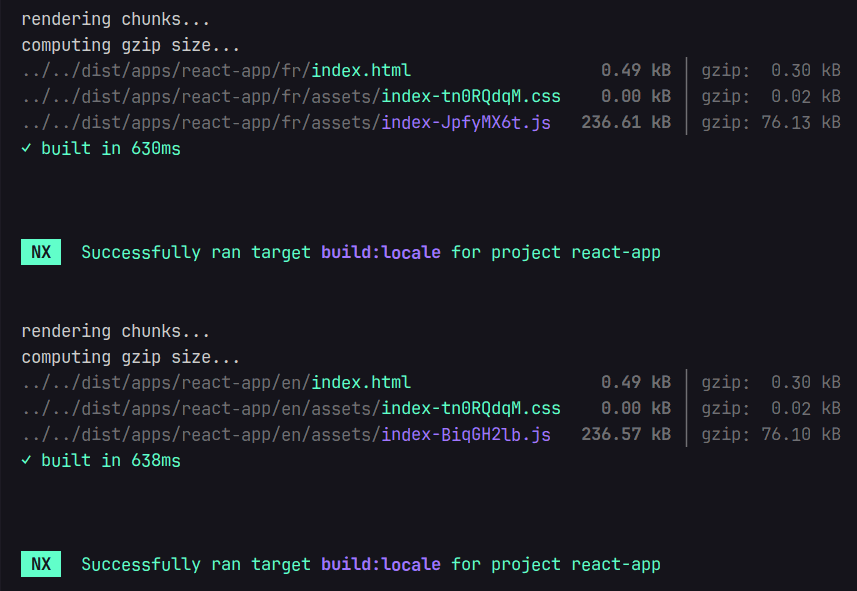
Supporting ICU Message Format
One challenge with @angular/localize is that ICU expressions are typically handled by Angular’s compiler, not by @angular/localize itself. For non-Angular frameworks, we need to implement runtime ICU evaluation.
The transformation approach
We can create a custom Babel plugin that detects ICU syntax in $localize templates and transforms them into runtime calls:
function makeICURuntimePlugin(locale: string, localizeName: string) {
  return function ({ types: t }: any) {
    return {
      visitor: {
        TaggedTemplateExpression(path: any) {
          const tag = path.get('tag');
          if (tag.isIdentifier({ name: localizeName })) {
            const quasi = path.node.quasi;

            // Check if template contains ICU syntax
            const hasICU = quasi.quasis.some((q: any) =>
              /[:,]\s*(plural|select|selectordinal)/i.test(q.value.raw)
            );

            if (hasICU) {
              // Extract message ID and build expression map
              const firstPart = quasi.quasis[0].value.raw;
              const idMatch = firstPart.match(/:@@([^:]+):/);
              const messageId = idMatch ? idMatch[1] : '';

              // Build the ICU message string and values object
              // ... (parsing logic)

              // Transform to: $localize._icu(id, message, locale, values)
              path.replaceWith(runtimeCall);
            }
          }
        },
      },
    };
  };
}
Using ICU expressions in React (or any framework)
In your React components, write ICU expressions just like in Angular:
export function App() {
  const [itemCount, setItemCount] = useState(0);
  const [minutes, setMinutes] = useState(0);

  return (
    <div>
      <p>{$localize`:@@itemsCount:{${itemCount}:VAR_PLURAL:, plural, =0 {No items} =1 {One item} other {${itemCount}:INTERPOLATION: items}}`}</p>
      <button onClick={() => setItemCount(itemCount + 1)}>
        {$localize`:@@actions.addItem:Add Item`}
      </button>

      <p>{$localize`:@@minutesAgo:{${minutes}:VAR_PLURAL:, plural, =0 {just now} =1 {one minute ago} other {${minutes}:INTERPOLATION: minutes ago}}`}</p>
      <button onClick={() => setMinutes(minutes + 1)}>
        {$localize`:@@actions.addMinute:Add Minute`}
      </button>
    </div>
  );
}
Implementing the ICU runtime
The Babel plugin transforms ICU templates into $localize._icu() calls. We implement this function to parse and evaluate ICU syntax:
import '@angular/localize/init';

// Implement the ICU runtime handler
if (typeof $localize !== 'undefined') {
  ($localize as any)._icu = function (
    messageId: string, // Translation key (e.g., 'itemsCount')
    message: string, // ICU template
    locale: string, // Current locale
    values: Record<string, any> // Runtime values
  ): string {
    // 1. Get translated template for current locale
    const translations = getTranslations(locale);
    const messageToUse = translations[messageId] || message;

    // 2. Parse ICU syntax
    const icu = parseICUMessage(messageToUse);
    if (!icu) return messageToUse;

    // 3. Evaluate with runtime values
    return renderICUMessage(icu, values, locale);
  };
}
The ICU parser extracts the structure from templates like {count, plural, =0 {no items} other {# items}}:
export function parseICUMessage(message: string): ICUMessage | null {
  const icuPattern =
    /\{([^,}]+),\s*(plural|select|selectordinal)\s*,\s*(?:offset:\s*(\d+)\s*)?((?:[^{}]|\{[^{}]*\})*)\}/;

  const match = message.match(icuPattern);
  if (!match) return null;

  const [, variable, type, offset, casesStr] = match;
  const cases: Record<string, string> = {};

  // Parse cases: "=0 {no items} =1 {one item} other {# items}"
  const casePattern = /(=\d+|\w+)\s*\{([^}]*)\}/g;
  let caseMatch;

  while ((caseMatch = casePattern.exec(casesStr)) !== null) {
    const [, caseKey, caseValue] = caseMatch;
    cases[caseKey.trim()] = caseValue.trim();
  }

  return { type, variable: variable.trim(), cases, offset };
}
And the renderer uses Intl.PluralRules for locale-aware plural selection:
export function renderICUMessage(
  icu: ICUMessage,
  values: Record<string, any>,
  locale: string
): string {
  const value = values[icu.variable];

  if (icu.type === 'plural' || icu.type === 'selectordinal') {
    const numValue = typeof value === 'number' ? value : 0;

    // Check exact match first (=0, =1, etc.)
    const exactMatch = icu.cases[`=${numValue}`];
    if (exactMatch !== undefined) {
      return exactMatch.replace(/#/g, String(numValue));
    }

    // Get plural category using Intl API
    const pluralRules = new Intl.PluralRules(locale, {
      type: icu.type === 'selectordinal' ? 'ordinal' : 'cardinal',
    });
    const category = pluralRules.select(numValue);
    const result = icu.cases[category] || icu.cases['other'] || '';

    return result.replace(/#/g, String(numValue));
  }

  // Handle 'select' type
  return icu.cases[value] || icu.cases['other'] || '';
}
With custom Babel transformation and runtime ICU evaluation, $localize now handles complex pluralization. The Intl.PluralRules API ensures correct plural forms for each locale, whether English’s two forms or Polish’s five.
Message extraction with a custom Nx executor
To complete the workflow, we can create a custom Nx executor that extracts $localize messages from any framework. The executor leverages Angular’s MessageExtractor to scan source files and output translation templates.
import { ExecutorContext } from '@nx/devkit';
import { MessageExtractor } from '@angular/localize/tools';
import * as glob from 'glob';

export default async function runExecutor(
  options: { sourceRoot: string; outputPath: string; format?: 'json' },
  context: ExecutorContext
) {
  const sourceFiles = glob.sync('**/*.{ts,tsx,js,jsx}', {
    cwd: path.resolve(context.root, options.sourceRoot),
    absolute: true,
    ignore: ['**/node_modules/**', '**/dist/**'],
  });

  const extractor = new MessageExtractor(require('@babel/core'), {
    plugins: ['@babel/plugin-syntax-typescript', '@babel/plugin-syntax-jsx'],
  });

  const messages = extractor.extractMessages(sourceFiles);

  // Convert to JSON format
  const translations = {};
  Array.from(messages.values()).forEach((msg) => {
    if (msg.id || msg.customId) {
      translations[msg.id || msg.customId] = msg.text;
    }
  });

  fs.writeFileSync(
    path.resolve(context.root, options.outputPath),
    JSON.stringify({ locale: 'en', translations }, null, 2)
  );

  return { success: true };
}
Register the target in project.json:
{
  "targets": {
    "extract-i18n": {
      "executor": "@myorg/tools:i18n-extract",
      "options": {
        "sourceRoot": "apps/react-app/src",
        "outputPath": "apps/react-app/src/i18n/messages.json"
      }
    }
  }
}
Then extract messages:
nx extract-i18n react-appThis approach provides automated extraction similar to Angular CLI extract-i18n, but works across any framework in the monorepo.
Bringing Node.js platform support
While we’ve focused on browser applications, the same $localize approach works for Node.js applications, useful for backend APIs, CLI tools, or server-side rendering.
Unlike client-side apps where bundlers handle the transformation, Node.js requires runtime setup. The goal is to make $localize work on the server without compilation step.
Runtime initialization
Create a setup module that overrides $localize and provides dynamic locale management with runtime ICU evaluation.
import '@angular/localize/init';
import { loadTranslations } from '@angular/localize';
import { parseICUMessage, renderICUMessage } from '@i18n-sandbox/i18n-webpack/runtime';
import * as fs from 'fs';
import * as path from 'path';

let currentTranslations: Record<string, string> = {};
let currentLocale = 'en';

// Export helpers for middleware to update per-request state
export const setLocale = (locale: string) => {
  currentLocale = locale;
};

export const setTranslations = (translations: Record<string, string>) => {
  currentTranslations = translations;
};

export const getTranslations = (): Record<string, string> => {
  return currentTranslations;
};

export const initTranslations = () => {
  // Load translations based on environment variable (for startup)
  const locale = process.env.LOCALE || 'en';
  currentLocale = locale;

  const translationsPath = path.join(__dirname, 'assets', 'i18n', `${locale}.json`);

  if (fs.existsSync(translationsPath)) {
    const content = JSON.parse(fs.readFileSync(translationsPath, 'utf-8'));
    currentTranslations = content.translations || {};
    loadTranslations(currentTranslations);
    console.log(`✓ Loaded ${Object.keys(currentTranslations).length} translations for ${locale}`);
  }

  // Set the locale globally
  ($localize as any).locale = locale;

  // Override $localize for runtime ICU evaluation
  (globalThis as any).$localize = function (
    parts: TemplateStringsArray,
    ...values: any[]
  ) {
    const messageId = parts[0].match(/:@@([^:]+):/)?.[1];
    let translatedMessage = parts[0].replace(/:@@[^:]+:/, '');

    // Get translated template from current locale
    if (messageId && currentTranslations[messageId]) {
      translatedMessage = currentTranslations[messageId];

      // Handle ICU plural/select expressions
      if (/\{[^}]+,\s*(plural|select|selectordinal)/.test(translatedMessage)) {
        const icuVarMatch = translatedMessage.match(/\{([^,}]+),\s*(plural|select|selectordinal)/);
        if (icuVarMatch && values.length > 0) {
          const varName = icuVarMatch[1].trim();
          const valuesMap: Record<string, any> = { [varName]: values[0] };

          const icu = parseICUMessage(translatedMessage);
          if (icu) {
            return renderICUMessage(icu, valuesMap, currentLocale);
          }
        }
      }
    }

    return translatedMessage;
  };
};
Integration with NestJS
A middleware can handle locale switching automatically per-request:
import { Injectable, NestMiddleware } from '@nestjs/common';
import { loadTranslations } from '@angular/localize';
import { setLocale, setTranslations } from '../i18n-init';

import EN from '../i18n/en.json';
import FR from '../i18n/fr.json';

const locales = { en: EN, fr: FR };

@Injectable()
export class I18nMiddleware implements NestMiddleware {
  use(req: Request, res: Response, next: NextFunction) {
    // Extract locale from path (e.g., /api/fr, /api/en)
    const pathLocale = req.path.split('/')[2];
    const locale = pathLocale === 'en' || pathLocale === 'fr' ? pathLocale : 'en';
    // Load translations for this request
    const localeData = locales[locale];
    setLocale(locale);
    setTranslations(localeData.translations);
    loadTranslations(localeData.translations);

    next();
  }
}
Register the middleware in your module:
import { Module, NestModule, MiddlewareConsumer } from '@nestjs/common';
import { I18nMiddleware } from './i18n.middleware';

@Module({
  controllers: [AppController],
  providers: [AppService],
})
export class AppModule implements NestModule {
  configure(consumer: MiddlewareConsumer) {
    consumer.apply(I18nMiddleware).forRoutes('*');
  }
}
Now your services can use $localize directly, translations are already loaded:
@Injectable()
export class AppService {
  getData(itemCount = 3, minutes = 5) {
    return {
      message: $localize`:@@api.welcome:Hello API`,
      language: $localize`:@@api.language:English`,
      timeExample: $localize`:@@api.time.ago:{${minutes}:VAR_PLURAL:, plural, =0 {just now} =1 {one minute ago} other {${minutes}:INTERPOLATION: minutes ago}}`,
      itemsExample: $localize`:@@api.items.count:{${itemCount}:VAR_PLURAL:, plural, =0 {No items} =1 {One item} other {${itemCount}:INTERPOLATION: items}}`,
    };
  }
}
Map routes to different locales:
@Controller()
export class AppController {
  constructor(private readonly appService: AppService) {}

  @Get('en')
  getDataEn() {
    return this.appService.getData('en');
  }

  @Get('fr')
  getDataFr() {
    return this.appService.getData('fr');
  }
}
Configure your bundler to copy translation files:
// webpack.config.js
assets: [{ input: './src/i18n', glob: '*.json', output: 'assets/i18n' }];
Now your API serves localized responses:
> curl -s http://localhost:3000/api/en | jq
{
  "message": "Hello API",
  "language": "English",
  "itemsExample": "3 items",
  "timeExample": "5 minutes ago"
}

> curl -s http://localhost:3000/api/fr | jq
{
  "message": "Bonjour API",
  "language": "Français",
  "itemsExample": "3 éléments",
  "timeExample": "il y a 5 minutes"
}$localize for ICU evaluation.Conclusion
By leveraging @angular/localize tooling as a universal i18n foundation, we can build a consistent and robust internationalization system across different frameworks and platforms.
Because we’ve standardized on a single i18n approach across our entire monorepo, we can now build upon this foundation and continuously improve the system. Here are some ideas to take it further:
-
Enforce conventions with Nx Powerpack: Use conformance rules to validate that all projects use
$localizefor i18n and prevent usage of other i18n libraries. -
Automated translation workflows: Integrate with translation management systems (like Phrase or Lokalise) to automatically extract messages, push them for translation, and pull completed translations back into your repository.
-
Type-safe i18n: Generate TypeScript types from your message IDs to get autocomplete and compile-time validation when using
$localize, preventing typos.
The standardization is what makes all of this possible, once you have a unified system, every improvement benefits the entire organization.